
Technology
Alpine Linux 3.24 scales new desktop heights with COSMIC
Key Points
Alpine Linux 3.24 is out, bringing a new desktop environment that should make for a very high-performance combination. Version 3.24.1 followed just four days later to fix some OpenSSL security issues. The 3.24 series contains new versions of GRUB, LLVM, Rust, Go, Qt, and NGINX.
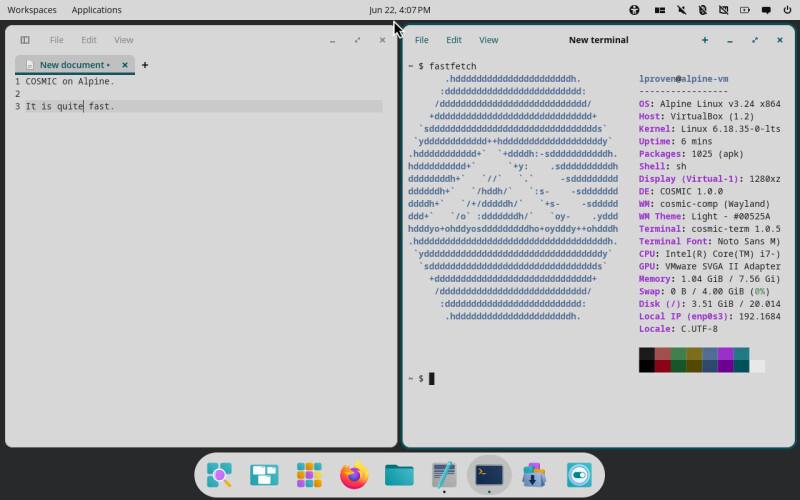
Alpine Linux 3.24 is out, bringing a new desktop environment that should make for a very high-performance combination. Version 3.24.1 followed just four days later to fix some OpenSSL security issues. The 3.24 series contains new versions of GRUB, LLVM, Rust, Go, Qt, and NGINX. Alpine isn't an entirely GNU-free Linux distro, but it doesn't use many components from the GNU Project: it's systemd-free and doesn't use the GNU standard C library, replacing it with musl libc. Even so, version 3.24 offers the latest GNOME 50 desktop, as well as version 6.6.5 of KDE Plasma. New for this release is "Epoch 1" of System76's COSMIC desktop. The Reg FOSS desk took a look at the new environment at the end of last year and came away impressed. COSMIC is the first pure-Wayland desktop environment we've tried that we would be willing to use full-time. We've tried it on some quite old machines, including a ThinkPad X220 with an Intel GPU and a ThinkPad T420 with an Nvidia GPU, and while we have seen occasional crashes on both, it's so snappy and makes such effective use of a small LCD that we're tolerating them and still using it. Given that Alpine Linux is also a useful OS for reviving sluggish old hardware, this has great potential as a happy combination. Version 3.24 came almost exactly six months after Alpine 3.23, which used the newly appointed LTS kernel, Linux 6.18. No newer kernel has since been designated as an LTS release, so Alpine 3.24 defaults to the same kernel series as its predecessor – unless you opt into following the Edge version. The Alpine Linux installation process remains quite complex and would be intimidating to newbies – although much the same can be said of Arch Linux, and that has not hindered its success, as reflected in the regular Steam surveys (although significant security issues might do). Alpine's installer has learned some new tricks in this version, including better handling of IPv6 and support for the new Limine bootloader. We upgraded our bare-metal install of 3.23, which only took a couple of minutes and went perfectly smoothly. We then installed COSMIC, which, aside from the wallpaper, looks identical to how it looks in Pop!_OS 24.04 and works just as fast. We also dug out one of our oldest ThinkPads, an X200S with a Core 2 Duo, and did a clean install of the new release on a blank SSD. It makes this 2008 laptop run so well that we'd put it into daily use if it wasn't for its flaky screen, which we forgive. We bought it secondhand a full 13 years ago, and it's seen a lot of hard work since then. The only snag we encountered with this first release of COSMIC on Alpine is that installing it doesn't add a display manager, so there's no graphical login screen, and launching it from the shell didn't work for us. When installed alongside KDE Plasma or Xfce, it works perfectly with their login screens. On a clean install, a fresh login using COSMIC took just 850 MB of RAM. For comparison, KDE Plasma 6.6.5 used 885 MB when freshly booted. Even with both desktops installed, Alpine 3.24 used a mere 3.5 GB of disk. Alpine is probably most widely used to run Docker containers, but it's more versatile than most distributions. The Reg FOSS desk mostly uses System disk mode, which is the only way most Linux distros can be installed. In this mode, Alpine runs from disk and can be set up as a normal desktop OS. It can also run in Diskless mode, in which the entire OS runs from a RAM disk, much like Tiny Core Linux. It also offers Data disk mode, in which the OS lives in RAM, but the /var directory tree is kept on disk – meaning that the RAM-based OS stores all its applications' config on disk. All of these can be customized as you wish. For instance, we have come across NAS setups in both System mode and the more radical Frood, which keeps all the software in Alpine's initramfs. If you don't mind learning some new stuff, we would definitely recommend Alpine over Arch – using musl libc means Alpine may be less compatible with some apps, but it's much smaller and faster. Flatpak goes quite some way toward helping with that, although, as we reported a week ago, Flatpak 2 might cause problems there. For now, though, if you want to avoid systemd (not to mention built-in Automatic Idiocy), then our recommendation is MX Linux for an easy life, especially if you want to dual-boot – and Alpine if you don't mind a bit more work, but prize a clean, simple, minimalist system. Xfce scales the Wayland heights As we have usually covered Xfce on Alpine – which for this vulture is a great match – we thought that for a change we'd include a few pictures of other, perhaps shinier, Wayland-based desktops. Thus, the included screenshots of KDE Plasma 6.6.5 and COSMIC 1.0.15, which are both entirely Wayland-based. The next release of Xfce, version 4.22, is expected at the end of this year. When the current release 4.20 shipped at the end of 2024, we reported that the team had begun adding Wayland support to the Xfce window manager xfwm4. At that time, it was so functionally limited that the recommendation was to use a different compositor, such as Labwc or Wayfire. That's how openSUSE Leap 16 runs Xfce on Wayland – by combining it with Labwc. This week, the Xfce project announced the first preview release of Xfwl4. It's still in its early stages and has half a dozen known serious issues, but it could be that by the time Alpine 3.25 is out, it will be possible to install it with Xfce on Wayland – without needing Alpine developer Ariadne Conill's Wayback server. Over in the Fediverse, Conill expressed her sadness that the project has not banned vibe-coded contributions – with which we sympathize. She's even mooted the possibility of starting a slop-free but Alpine-compatible distro. ®
[Image text:] Workspaces
Applications
Jun 22,4:07 PM
File
Elt
View
File
View
New terminal
+
New document
X
~5 fastfetch
1 COSMIC on Alpine.
ypPPPPPPPPPPPPPPPPPPPPpy'
1proven@alpine-vm
:dddddddddddddddddddddddddd:
3 It is quite fast.
/dddddddddddddddddddddddddddd/
OS: Alpine Linux v3.24 x864
+dddddddddddddddddddddddddddddd+
HostVirtualBox (1.2)
sdddddddddddddddddddddddddddddddds
Kernel:Linux 6.18.35-0-1ts
ydddddddddddd++hdddddddddddddddddddy
Uptime: 6 mins
.hddddddddddd+
'ypppPPpppppps-:ypppP+,
Packages:1025 apk
hdddddddddd+
+y:
4PPPPPPPPPps'
Shell: sh
ddddddddh+'
-sddddddddd
Display (Virtual-1):1280xz
.+ypPpppp
'/hddh/
:5-
PPPPPPps-
'+5-
DE:COSMIC1.0.0
ddddh+'
/+/dddddh/
-sddddd
WH cosmic-comp (Wayland)
.+ppp
/odddddddh/
oy-
pppA
WM Theme:L1ght -#00525A
ypppyo++ApppAo+oypppppppppsoAppyo+oApppy
Terminal: cosmic-term 1.0.5
.hddddddddddddddddddddddddddddddddddddh.
Terminal Font: Noto Sans M)
yddddddddddddddddddddddddddddddddddy
CPUIntelRCoreTM i7-)
sdddddddddddddddddddddddddddddddds
GPU: VMware SVGA II Adapter
+dddddddddddddddddddddddddddddd+
Memory:1.04 GiB /7.56 Gi
/dddddddddddddddddddddddddddd/
Swap:0 B/4.00 GiB 0%)
:dddddddddddddddddddddddddd:
Disk (/:3.51 Gi8/20.014
.hddddddddddddddddddddddh.
Loca1 IPenp0s3: 192.1684
Locale:C.UTF-8