
Technology
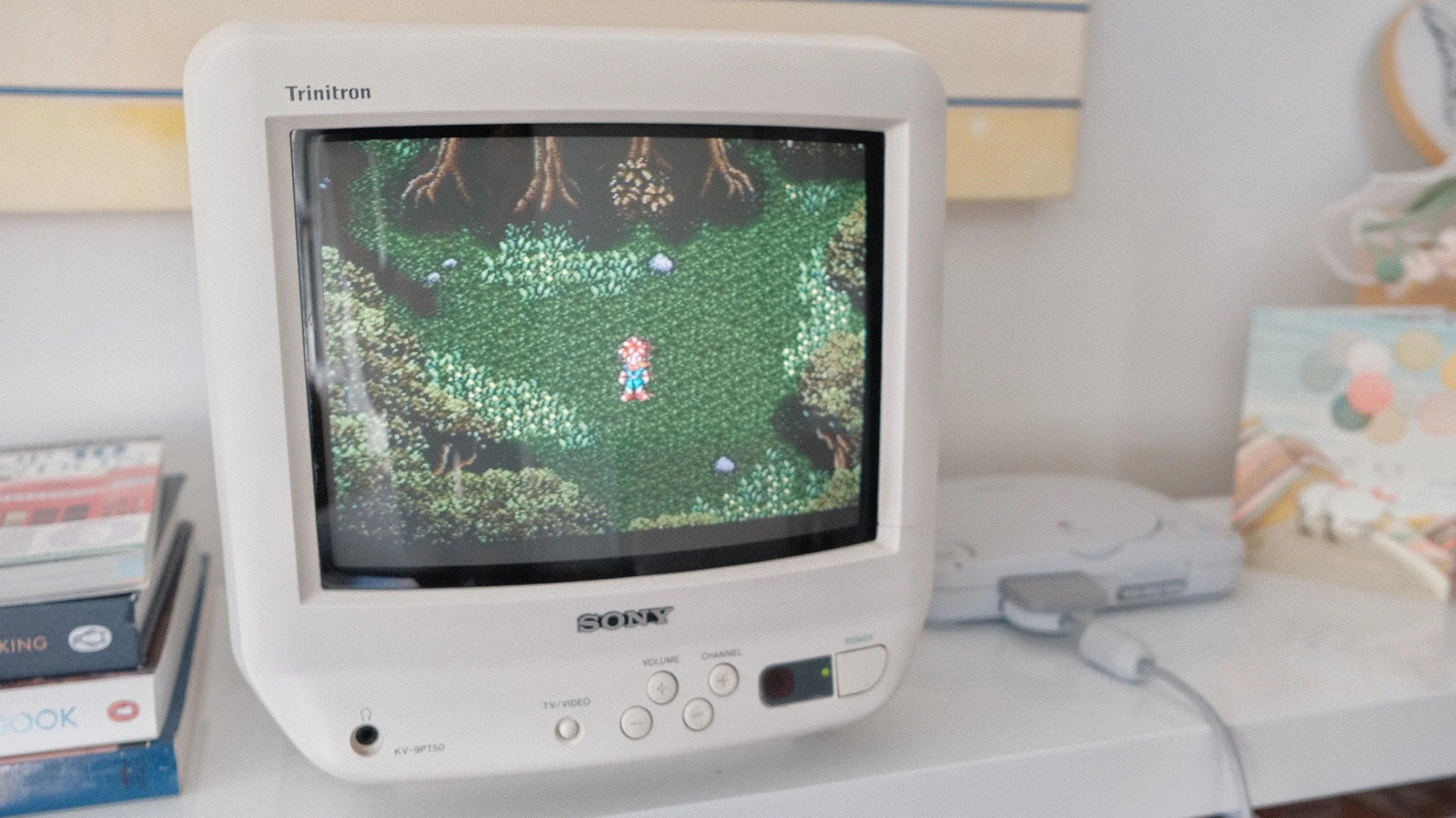
Here's why retro games look better on old CRT TVs
Key Points
Here's why retro games look better on old CRT TVs Your favorite games did look better when you were a kid, but it's not just nostalgia talking. If you've ever tried to use your favorite childhood game console with a new TV or monitor, you were likely disappointed by what you saw. This isn't an issue when playing a version ported to modern systems, but is immediately obvious on the original hardware.
Here's why retro games look better on old CRT TVs
Your favorite games did look better when you were a kid, but it's not just nostalgia talking.
If you've ever tried to use your favorite childhood game console with a new TV or monitor, you were likely disappointed by what you saw. This isn't an issue when playing a version ported to modern systems, but is immediately obvious on the original hardware. While it's easy to blame nostalgia, the reason your favorite retro games don't look the way they do in your memory is more complicated.
The short answer is those games weren't meant to viewed on modern flat-panel displays. Games from the '80s, '90s and early 2000s were instead designed for the dominant display technology of their time: the humble cathode ray tube (CRT). It's an example of how technology and its shifts can shape an art form.
The mismatch you find when you revisit a favorite game is the result of playing it outside of the context you originally experienced it in.
How do CRTs work?
When most of us think of CRT TVs and monitors, we tend to remember their disadvantages relative to modern flat panels. They were big, noisy and, most of all, heavy. Yet for all their faults, they represented an amazing bit of technology.
Inside every bulky CRT display is a sealed vacuum tube with one or more electron guns pointed at a phosphorescent screen. CRT TVs and monitors don't display individual pixels like their modern counterparts. Instead, they draw many horizontal "scanlines" each time their electron guns fire and ignite the phosphors at the front of the screen. Those lines are drawn from left to right, top to bottom, for every frame the display renders. Yet to the human eye, that process appears instantaneous.
This is quite different from how LCD and OLED screens work. They instead use a technique called sample-and-hold, meaning they display a full frame and hold it until they refresh. Due to this technical difference, CRTs offered far greater motion clarity than their LCD counterparts for many decades. It was only recently, with the introduction of high refresh rate displays, that LCD and OLED screens have come to match CRTs on that front. This is apparent when you revisit a game like The Legend of Zelda: Ocarina of Time. Its frame rate was low (20FPS) and inconsistent when you were a kid, but it was less noticeable because of how CRTs handled motion.
How do CRTs handle resolution?
Motion is only one part of why retro games don't look right on modern TVs; resolution is the second major factor. CRT displays don't have "native" resolutions like their LCD and OLED counterparts. They can render many different resolutions without the smearing that happens when you try run a flat-panel screen at a resolution lower than its native one. The console gaming industry standardized around two resolutions prior to the PlayStation 3 and Xbox 360 era: 240p and 480i.
Today, 240p and 480i are defined as "standard definition" resolutions to differentiate them from the "high definition" and "ultra-high definition" resolutions that came after. The majority of CRT TVs ever produced were standard definition sets. Some high definitions sets were made, but by the start of the HD era, LCD screens had begun to overtake CRTs in popularity.
Yet another nice example of a developer keeping a midrange, composite-only, consumer CRT nearby to check how the game's visuals would look for the end user.
(image via @crtbot.bsky.social)
— CRT Pixels (@crtpixels.bsky.social) 2025-06-27T22:36:07.415Z
The number in each resolution is straightforward: 240p involved a CRT TV drawing 240 horizontal lines, while 480i saw it draw 480 lines. The letter that follows each resolution is more complicated. The "i" in 480i is short for "interlaced." When displaying an interlaced signal, a display completes two alternating passes to draw an image. It will first draw all the odd-numbered lines before doing the same for all the even-numbered lines. This sounds like a convoluted way to render an image, but at a time when technology was limited, interlacing allowed broadcasters to save on bandwidth. One byproduct of interlacing was producing the flicker CRTs are known for.
By contrast, the "p" in 240p stands for "progressive," which it works exactly like it sounds. Such displays will draw all the lines in an image consecutively. All HD resolutions are progressive resolutions. 240p allowed CRT TVs to render an image without flicker, and before the PlayStation 2 and GameCube era, it was the resolution most consoles targeted for that reason. However, standard definition CRTs render 240p differently than modern TVs. They leave the even-numbered lines black. Many people refer to these lines as "scanlines," though that's technically incorrect. Still, those lines, especially when paired with pixel graphics, are what most people think of as the CRT look.
Why do retro games look better on CRT TVs?
Now we have enough of a base to understand why retro games look the way they do on modern TVs. One major issue is that recent LCD and OLED TVs don't offer great analog connections. If you're lucky, your TV might have composite ports. But even if that's the case, composite cables introduce a lot of noise to the signal from your console.
Chrono Trigger (1995, Squaresoft) – SNES
PC Emulator vs. SNES Composite via Sony KV-14M10
Recycling this comparison I did last year for Toriyama's passing in celebration of Chrono Trigger's anniversary!
— CRT Pixels (@crtpixels.bsky.social) 2025-03-11T16:33:26.109Z
Another roadblock is that modern screens aren't designed to display interlaced content. They use software to convert 480i content to 480p. That process, known as "deinterlacing," introduces input lag, which makes games feel less responsive. What's more, many moderns TVs will detect 240p content as 480i, which they will then once again try to deinterlace. In that case, the process produces visual artifacts like motion blur. This all happens before your TV attempts to upscale a 480p image to 1080p or 4K. Unless you own a dedicated scaler like the RetroTink 4K, blowing a 240p image up to 4K will not look good.
Final Fantasy Tactics (1997, Squaresoft) – PS1
Sharp Pixels vs. PS1 Composite via Sony KV-27S43
FFT is actually THE game responsible for this blog. When I got an HDTV in 2012, I hooked up my PS2, but when I saw FFT's dithering for the first time I thought my console was broken!
— CRT Pixels (@crtpixels.bsky.social) 2025-06-04T15:08:48.777Z
Then you have the fact that retro games' art was designed for display on CRTs. Over decades, video game artists developed and perfected techniques to make pixel art (and later 2D textures) look more lifelike. Dithering was one of those techniques. This involved artists adding visual noise to sprites and textures, often in the form of a checkboard pattern, to create smooth color gradients. Dithering is transformative on CRTs due to how the technique interacts with a phosphorescent screen; on an LCD or OLED, it completely loses its effect. In fact, for the recent rerelease of Final Fantasy Tactics, Square Enix removed dithering from the game's Classic presentation mode for that exact reason.
Separately, there are games like Silent Hill 2 and Doom 3 that look washed-out unless you play them on a CRT or OLED. Until the recent advent of local dimming, LCD panels could not produce deep blacks due to the tech's reliance on backlighting. This limitation of LCDs changed the look of games for more than a decade.
Should you buy a CRT TV?
I love CRTs, but I don't recommend you buy one. For the most part, they don't fit into modern life. They're heavy, noisy and repairs are often difficult and can even be dangerous to carry out if you don't know what you're doing. Finding a quality set is also becoming harder. If someone has a CRT TV or monitor that's even a bit of a collectable like my Sony KV-9PT50 (pictured above), they almost certainly know its value and will ask eye-watering amounts of money to part with it.
I do think CRTs are still the best way to experience retro games, but with devices like the Analogue 3D (our review), there are more convenient ways to experience most of what those titles had to offer. In fact, many modern emulators offer great CRT filters that can get you 99 percent of the way there. But don't let me stop you if you're inspired you start shopping Facebook Marketplace for a CRT!
[Image text:] Trinitron
KINC
OOK
SONY