
Technology
Pixel Watch 5 review: A fantastic watch that's missing features at launch
Key Points
Pixel Watch 5 review: A fantastic watch that's missing features at launch Still a solid smartwatch that does just enough to make up for the price hike. One of the most frustrating things about reviewing any new device before it is available to the public is ensuring we have the right software and features. Often, companies announce upcoming features that will come to devices in the weeks or months after they go on sale, but don't have them available for testing before that.
Pixel Watch 5 review: A fantastic watch that's missing features at launch
Still a solid smartwatch that does just enough to make up for the price hike.
One of the most frustrating things about reviewing any new device before it is available to the public is ensuring we have the right software and features. Often, companies announce upcoming features that will come to devices in the weeks or months after they go on sale, but don't have them available for testing before that. The testing process is all the more tricky with things like smartwatches, where you frequently have to wear them for at least a week before certain features kick in.
All that is my overwrought excuse for why I didn't have a full review of the Pixel Watch 5 ready earlier this week. I've had it for just about seven days and simply don't feel like I've managed to get enough testing done. Plus, new features like the workout builder and blood pressure and insulin resistance trend reports won't be available until September, and it felt remiss to put up a review with a score.
That's not to say there isn't enough here for me to tell you whether the watch is good. I've learned about a lot of the basics, like how it tracks activity and sleep, or whether it holds up to my daily workouts and weekend adventures. And I've spent time with new features like Gemini updates, more accurate GPS tracking and improved battery charging speeds.
For now, I'm reviewing the Pixel Watch 5 as it is. I will continue to use and test it in the following weeks and, when the new functions land, I will update this review with my impressions. While I don't expect that any of these new features will affect the initial score I'm giving the Watch 5, I will adjust that number accordingly and note the change if they do.
Hardware and display
The Pixel Watch 5 isn't very different physically from the Pixel Watch 4. According to Google's own comparison chart, there is a slight disparity in the display, with the newer watch listed as using a 320ppi AMOLED panel while the older model's is described as "custom." I'll get into how the display held up in real life, but long story short, the two devices are basically the same.
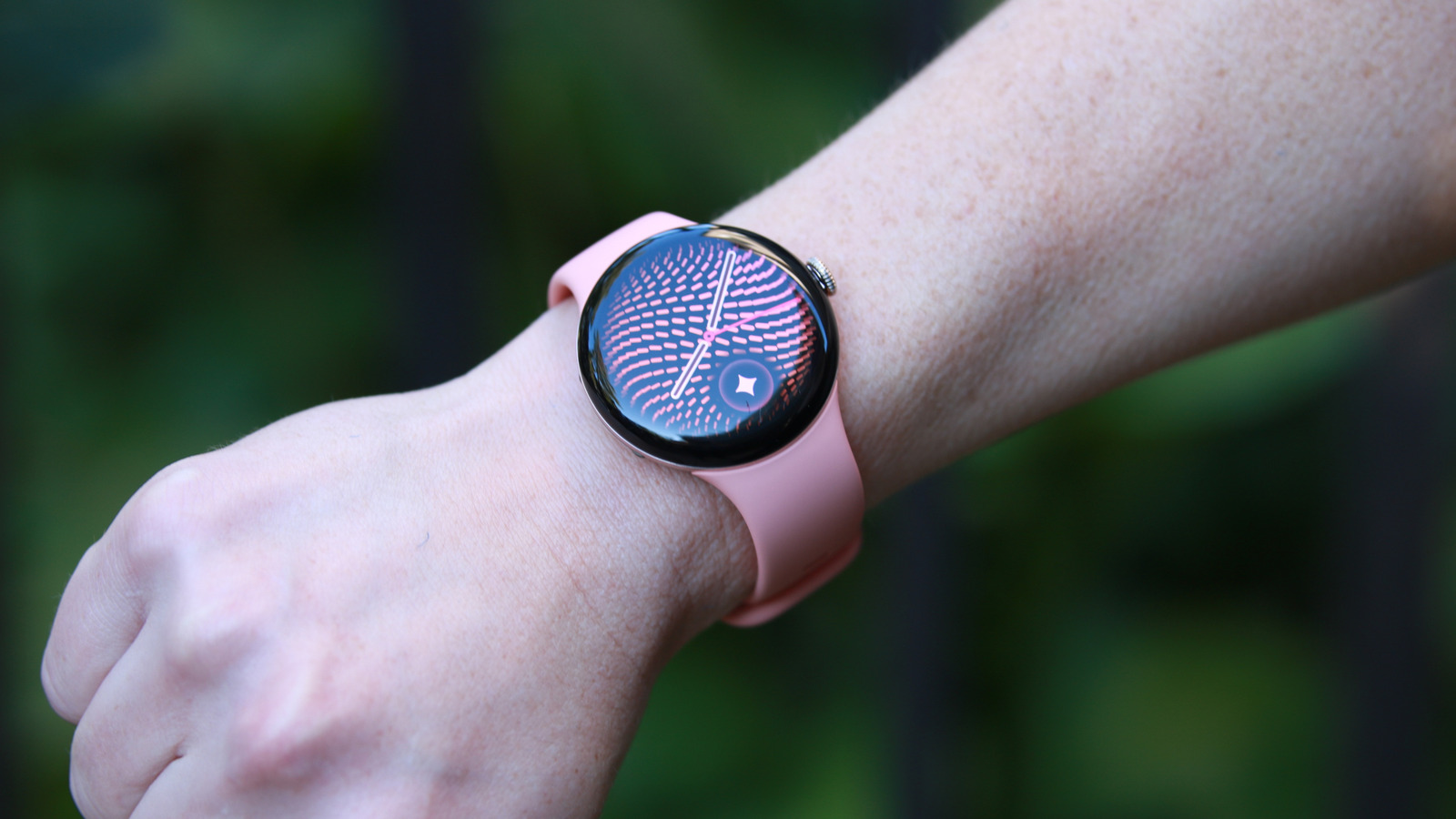
I do love the peachy canyon shade of my Watch 5 review unit, and it was a beautiful match for the Pixel 11 Pro in the same hue. I will say, though, that I'm a bit concerned to find some discoloration on the band already, with some sort of dark stain appearing along its edges. I'm not sure if this might be because I recently started using a new black purse that might be leeching color, but it was saddening. Google does sell replacement or additional bands from $50 to $200, in case you wanted a spare.
We're at the point in smartwatch maturity where I no longer need to say how these compare to traditional watches. Like the Galaxy Watch 9 and the Apple Watch Series 11, the Pixel Watch 5 is light and mostly unobtrusive. While I still hate to wear any of these things to sleep, it's at least easy to forget you have them on when you're out on a grocery run or just lounging around at home.
The one thing I will point out is that because of its domed glass case and display, the Pixel Watch seems more vulnerable to damage than the competition. But I've yet to break one, and thanks to its repairable design, I'm not very worried about completely ruining the device. And yes, the Pixel Watch 5 remains the only mainstream smartwatch with a replaceable screen and battery, which adds to its appeal.
Speaking of, the Pixel Watch 5 can get as bright as up to 3,000 nits, which is the same as its predecessor. In practice, the Watch 5 was easy enough to read, though that's at its highest setting. When the screen dimmed in battery-saving mode, I struggled to see words on it.
While I'm talking about hardware, I might as well point out that the Pixel Watch 5 has a Snapdragon W5 Gen 2 Accelerated processor, compared to the Watch 4's Snapdragon W5 Gen 2. It's essentially the same chip, but the "Accelerated" version adds more memory and increases clock speeds slightly.. Both devices have the same IP68 rating for dust and water resistance, too.
WearOS and Gemini updates
In the process of this review, I had to update the following:
-
The Android software of the phone my watch was connected to, which happened to be a Pixel 11 Pro.
-
The Pixel Watch app (on phone)
-
The Google Health app (on phone)
-
System restart (on both phone and watch)
I also had to go into the Play Store on the watch itself and update at least eight apps there, including Health, ECG, Gemini, Messages, Pixel Watch Manager, Wear OS and Wear Media. At every step of testing, when a feature wasn't working or was missing, I had to make sure I turned on yet another setting (Gemini, Gestures, Proactive Intelligence etc).
I say all that to add to the excuse pile of why it has taken me so long to write this review, but also to warn you that, should you get a Pixel Watch (or perhaps any other smartwatch) at launch, there will be a lot of settings and possible updates to wade through.
When you're all set, you should find quite a few improvements. Google has introduced a few new elements to the Pixel Watch's interface, including redesigned complications, new At a Glance pop-ups, expanded one-handed gestures and a refreshed appearance for Gemini on your wrist. And since it's the era of AI, there's also a new watch face generator that takes your prompts and turns them into wacky clocks.
The entire mechanism is a bit simplistic, though. No matter what you describe, it only impacts the style of the clock font. The rest of the stuff on the face, like the complication size and placement, are all fairly rigid. You can customize the four arcs around the clock by choosing which complications to use, and pick the color palette you prefer. Otherwise, all your whimsical descriptions like "flowery nature vibe" or "woodland elves prancing around a magical forest" will only impact the numbers that display the time.
It's a fun touch, just not quite as impactful as I'd like. My prompts, which included the woodland elves one and one that said "smiley faces and emoji faces in a celebratory vibe" delivered great results, but I ended up preferring the Photos watch face featuring myself (and occasionally my loved ones) anyway. There are two new watch faces for the Pixel Watch 5 — Weave and Chronograph. They're both attractive enough, plus the new Multicolor option for complications makes things feel more vibrant.
Even then, I think Google could learn something from Apple. While the former does have a wide variety of watch face styles to choose from, Apple's watch faces, especially the ones with dynamic clock sizes, simply look better.
I do think Google has a smarter approach when it comes to widgets and tiles, though. You can customize the pages that appear when you swipe sideways on the Pixel Watch 5, which made it very easy for me to put my favorite functions within reach. Logging my morning workout, starting a recording, setting a timer and my favorite contacts are all just a few swipes away. I also appreciate that these widgets feature large, easy-to-hit buttons.
I'll quickly go over some of the rest of the features new to the Pixel Watch 5. Arguably my favorite update is on-device Gemini, which I said last week was a bit overdue. When I was reviewing the Pixel Watch 4, I was deeply frustrated to find that Gemini was unresponsive when I left my phone behind and went on a run. I tried to ask the watch to log a workout or start a timer but had to stop and swipe through the faces to do so instead.
This time, you can ask Gemini to perform some basic tasks without needing a connection. These include setting timers, starting workouts, controlling your music playback, toggling your settings like water lock or Wi-Fi and even opening specific apps. Not only is the system now freed from needing a phone (or cellular network), it's also a lot faster as a result.
Google also gave the Gemini interface a slight cosmetic refresh, so when the lower half of your screen glows when you're talking to the assistant, its appearance matches the rest of Google's Neural Expressive design. I like that it is easier to see what you've said to Gemini and doesn't get in the way.
That bottom half of the display is also where you'll see the new "At A Glance" chips pop up. This is similar to Apple's smart stack hints. Whenever the system detects it might have relevant, timely information, it will show you a little button. This could be anything from an incoming Lyft ride, an ongoing workout or a boarding pass for your flight. Basically, apps that use the Live Update feature on Android should show up here, and you'll be able to see multiple items or more details by swiping up.
I also liked double pinching my fingers in the air to open up At A Glance, as it was a convenient way to quickly view what I needed without even having to touch the screen. Previous Pixel Watches already supported the double pinch and wrist turn feature, but with this year's model, Google made the gestures more functional. Now, double pinch can not only open At A Glance from the watch face, but it can also open the notification center. When a scroll bar is visible in Gemini's responses or in your workout metrics or wallet app, double pinching will scroll through the content. Double pinching will also toggle between Maps views and manage the Recorder app, while the wrist turn action is now a universal back navigation.
That last addition is major for me. The act of turning your watch face away from you as a dismissal is so intuitive, it just makes sense. Plus, a universal back gesture is in my opinion one way Google's interfaces are sometimes superior to Apple's. I still love how, in Android, a simple swipe in from either edge of a phone screen takes you back to your previous page or app.
Health and activity tracking
Since I reviewed the Fitbit Air in May, I've kept wearing it every day and the Google Health app has a fairly extensive and up-to-date base of knowledge about me. That's helpful, as I don't have to re-test a bunch of things or wear the Pixel Watch 5 for a few extra days for some baseline calibration. I also appreciate the Health app's ability to distinguish between the data from the two devices, so it's not logging multiple workouts when I've gone for a walk with both wearables on me.
That said, I did have to laugh when I got home one evening and saw an alert congratulating me on an elliptical session. Comparing the time of the auto-detected activity to my movements, I realized it had thought my walk home was an elliptical workout. I guess my hips do lie. Or at least, the Pixel Watch 5 thinks they do.
Fixing that mistake was easy enough; I just tapped one of the suggested chips in the activity's listing in the app and Google renamed my exercise.
In general, I've always found Google's (and Fitbit's) wearables to be better at automatically detecting when I've been working out than Apple's. And though all three devices I wore during a long bike ride along the Delaware river did recognize that activity without prompting, my Apple Watch recorded the most comprehensive data.
That's in part due to guidelines around auto-detection and your privacy, as well as how Apple prompts you to record an activity it detected. When these gadgets automatically log your walks, runs or bike rides, they tend not to include your location as you didn't consent to that being tracked. But because an Apple Watch will surface a prompt to get you to agree to recording the detected activity, it basically has buy-in from you that the location data can be used.
That's what I think, anyway, And because I tapped the "Record outdoor cycle" prompt on my Series 11, it was able to tell me that I rode for 7.54 miles, with an average speed of 8.8 MPH and elevation gain of 35 feet. Plus, I got to look at a pretty map of my trail afterwards. Meanwhile, the Google Health app only told me I burned 216 calories, averaged a heart rate of 104 bpm and earned 21 cardio load points. All of those things Apple also showed.
When I later remembered to manually start logging a bike workout on the Pixel Watch 5 for the return trip, it did capture information about distance, path, elevation gain and speed.
That was a slight detour on something that isn't new to the Pixel Watch 5, but it does bring me to something that is: improved accuracy on GPS route tracking. I've explained it in my hands-on last week, but basically, Google says it's made the "most accurate GPS route-tracking ever on a Pixel Watch."
Improved GPS-tracking
It did so by using data from a worldwide network of GPS reference stations, and traces rays from GPS satellites through 3D models of buildings to compensate for interference. Using basically the same dual-frequency hardware as the last-gen watch, Google says its latest method makes the Pixel Watch 5 two times more accurate than older models. It even claims to be more accurate than the Apple Watch Ultra 3 and Garmin Fenix 8 Pro.
I still need to run a side by side comparison with the Apple Watch Ultra 3 to see if that claim holds true, but in my testing next to the Apple Watch Series 11 (which is closer in cost to the Pixel), Google did seem slightly more accurate. While both devices delivered fairly detailed maps of my journey along a waterside walkway in Bayonne, the Pixel's path reflected my many little zigzags while the Apple one didn't do as much. I deviated from the trail a few times to avoid a flock of geese and a golf cart hurtling down a bridge. Both watches caught my efforts to dodge the waterfowl, but only Google's tracking system noticed me getting out of the way of the vehicle.
Of course, improved route-tracking isn't meant to showcase anyone's obstacle-avoiding skills. The idea is that if every little step you take can be accurately mapped, your actual distance traveled can be better calculated. That then has an impact on other metrics like your pace and cadence.
I don't really need modern smartwatches to be more accurate than they already are, and I believe you should really be monitoring your trends over time rather than minute changes in the quantity of anything, anyway. But I have to admit this is a smart move from Google that so far appears to be implemented well. I'd still like to further test it in building-dense areas against the Apple Watch Ultra 3, too, and will update this piece after I've done so.
I wore the Pixel Watch 5 to bed to give its sleep-related updates a shot, and I was happy to be told I got a solid 8 hours and 37 minutes of sleep that night. But I couldn't tell you if the new, more accurate sleep stage insights were indeed more accurate, not to mention 15 percent more so, like Google promised.
The company updated its machine learning models and says the increase in accuracy made its sleep tracking fundamentally more reliable. Sure, but it's hard for me to tell you how effective it was in this review. Did I really spend 50 minutes in deep sleep, compared to maybe 48 minutes the Pixel Watch 4 might have counted? This is a gooey type of science at best, so I won't dwell on it too much. As always, I'd rather look at my data trends over time than fixate on numbers.
Other new health features pending
Pretty much all the new features that Google is bringing to the Pixel Watch 5 will also be rolling out to the previous model. So while I can't test things like sleep breathing quality, blood pressure and insulin resistance trend tracking, or the custom workout builder and "advanced strength training," that shouldn't get in the way of helping you choose between the two versions. In other words, if you currently have a Pixel Watch 4 and are reading this to help decide whether you should upgrade, the answer is: don't.
Google also expanded the loss of pulse detection alerts that it introduced in 2024, bringing a feature it's calling breathing emergency detection this year. But the feature is currently only available in some European countries, and also, short of me somehow managing to develop a persistent drop in oxygen saturation, there is no real way for me to test this, though our editor in chief Aaron Souppouris may have a solution and volunteered as tribute.
Battery life and charging
I've been wearing the Fitbit Air since I reviewed it, and have gotten used to just plonking it on a charger whenever I need juice. It recharges so quickly that I never have real battery anxiety, though I do have to carry a charger wherever I go.
I thought I could expect something similar with the Pixel Watch 5, but it charges at the same rate as its predecessor. That's not a bad thing, as I was already very impressed with the Watch 4's speediness in that regard. But because the Pixel Watch doesn't last as long as the Fitbit Air, I found myself having to recharge more frequently. The good news is that I was still able to get from close to 3 percent to about 20 percent in a few minutes, so I could head straight into a 45-minute workout class without worrying about losing my metrics.
In my experience so far, the Pixel Watch 5 generally matched the battery life of the Apple Watch Series 11. That is to say, both last almost a full two days. I'd caution, though, that since I was on various versions of software during the course of this review, it's tough to say how this might change. I'll keep an eye on runtimes and update this review when I get a better sense for the battery life here.
Wrap-up
As it stands, the Pixel Watch 5 is a very good smartwatch. It's basically the same as the previous generation, with a few ambitious attempts at enhancing some essential features and some that are less important. On-device Gemini is a huge and necessary improvement, whereas watch faces generated by AI is more of a "fun to have" item. Thanks to its speedy charging, battery anxiety is basically a non-issue, and while I couldn't test it for this review, what little time I did have with the upcoming Workout Builder tool at my hands-on session last week was promising.
At this point, I don't think any of the features I have yet to test are going to make the watch worse in some measurable way. With its handy gestures and improvements to Gemini, Google has made the Pixel Watch 5 a solid, if small, upgrade to the already very satisfying Pixel Watch 4. I still have some reservations over the Google Health features that are locked behind Premium, but even without the AI Coach and other paid tools the app is an easy-to-use repository of all your metrics. So far, it feels like the Pixel Watch 5 delivers enough to justify the $50 increase in price, and looks good while it does.