
Technology
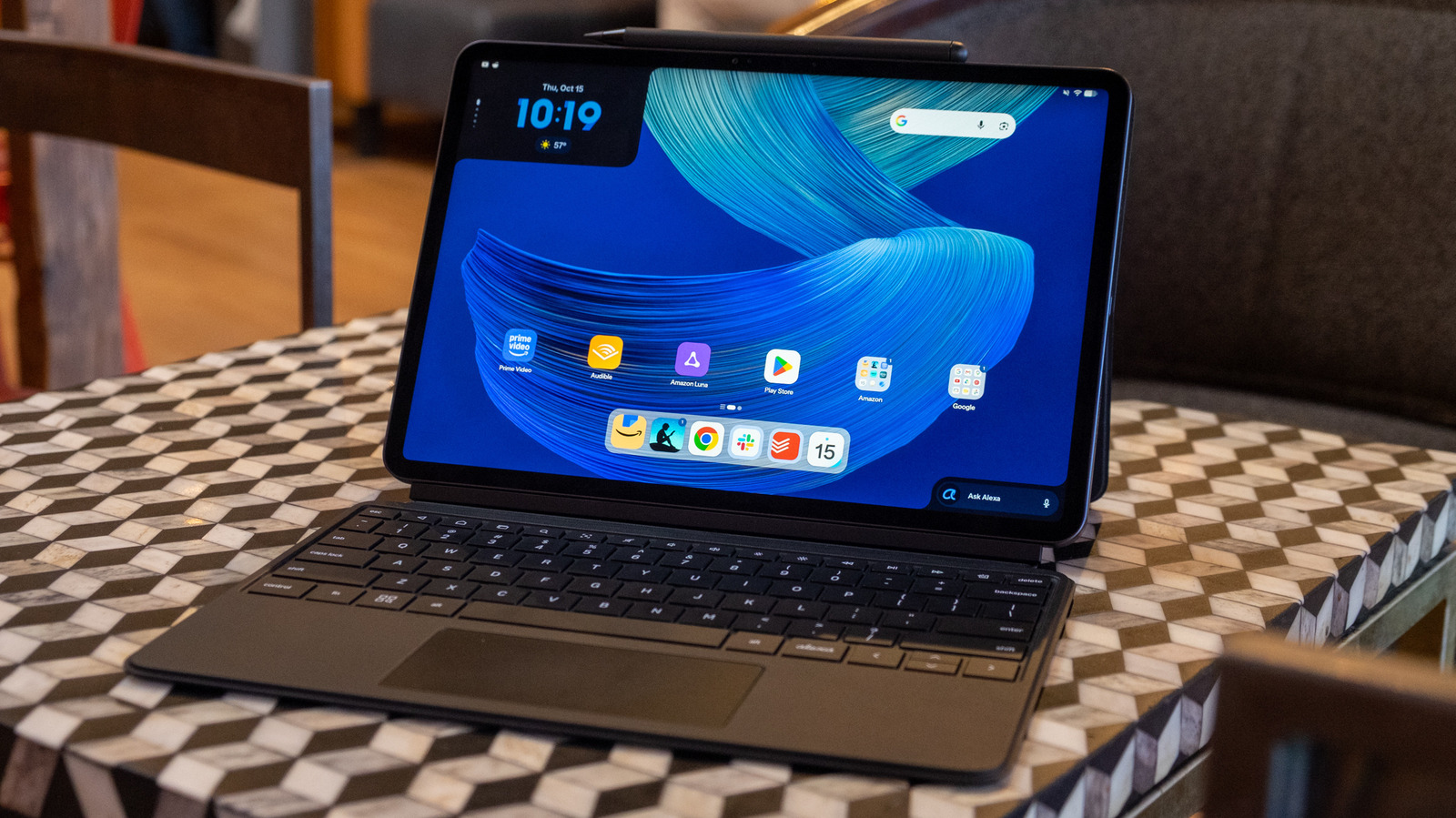
Alexa Tablet 12 Pro review: Amazon's premium tablet gets almost everything right
Key Points
Alexa Tablet 12 Pro review: Amazon's premium tablet gets almost everything right This tablet is a great value, even if Android apps still aren't great on a big screen. Amazon has long followed the same formula for its tablets. Fire tablets are known to be cheap, durable devices good for watching video and doing casual tasks like browsing, playing basic games and checking out Facebook.
Alexa Tablet 12 Pro review: Amazon's premium tablet gets almost everything right
This tablet is a great value, even if Android apps still aren't great on a big screen.
Amazon has long followed the same formula for its tablets. Fire tablets are known to be cheap, durable devices good for watching video and doing casual tasks like browsing, playing basic games and checking out Facebook. They're more limited than the average Android tablet, without access to the Google Play Store and its wealth of apps. Amazon's own app store has received plenty of support from developers over the years, but it's still missing plenty of crucial options like Whatsapp and YouTube, just to name a few.
This year, however, Amazon is changing up its strategy. Its new series of Alexa tablets may highlight the company's services and assistant first and foremost, but they're also full-fledged Android tablets with plenty of Google's own apps and access to the Play Store. The Alexa Tablet Pro 12 is easily the most intriguing of the new lineup (which also includes non-pro 8- and 11-inch options). While Fire tablets have always focused on media consumption, the Tablet Pro 12 is clearly squaring off with the iPad Air and Pro. At first glance, it looks nearly identical to Apple's tablets, with a fairly thin bezel surrounding a lovely and large display, and an aluminum unibody design that's relatively thin (6.5mm) and light (1.21 pounds).
Its optional keyboard and stylus accessories complete the look and signify that the Alexa Tablet Pro 12 isn't just meant for watching videos. This is a tablet meant for getting things done — and while it isn't quite as capable as Apple's iPad lineup, mostly due to software limitations, its $499 starting price means it's much easier to forgive the places it falls short.
Hardware
You'll be forgiven if you mistake the Alexa Tablet Pro 12 (from here out I'll just call it the Alexa Tablet) for a recent iPad Air or Pro, because they look very similar. The shorter sides of the Alexa Tablet have speakers on them; one end has a power button with a fingerprint sensor for unlocking the tablet, while the other has a lone USB-C port for charging and data transfer (it recognized my SD card reader and a USB-C flash drive without issue). I'm bummed not to see a headphone jack anywhere, but not surprised.
On the Alexa Tablet's top edge, you'll find volume up and down buttons as well as a groove where you can magnetically attach the Alexa Tablet Pro Pen for charging and storage. The bottom side meanwhile has a four-pin port where the Alexa Tablet's keyboard connects. The back of the not-quite-pitch-black tablet has a single 13-megapixel camera and the word "alexa" in a charming cursive font — the word Amazon doesn't appear anywhere on the device.
The Alexa Tablet sits comfortably between the 11- and 13-inch iPad Air in terms of thickness and weight. It's slightly thicker at 6.5mm (compared to 6.1mm) and a bit heavier than the 11-inch iPad Air (1.21 pounds compared to 1.02 pounds). Regardless of these minute differences, the Alexa Tablet's aluminum unibody design feels study, premium and well-balanced. It's a huge step forward from most Fire tablets I've tried over the years.
Nanomatte display
As with all tablets, the Alexa Tablet Pro 12 is dominated by its screen. The 12-inch screen may not be an OLED, but it's still a very nice display with 500 nits of brightness and a 2,800 x 1,840 resolution. That works out to a very dense 280 pixels per inch, and the 3:2 aspect ratio is definitely preferable on a tablet to something like 16:9. The tablet is primarily designed to be used in landscape mode, but the on-screen keyboard is a bit cramped from a vertical space perspective. And when you use the Alexa Tablet in portrait, it feels just a bit too tall to be comfortable. Apple's tablets have always used a 4:3 aspect ratio, and that just feels right to me at this point. But 3:2 still offers a decent amount of vertical height while still giving widescreen movies plenty of space.
And while I might prefer the iPad's aspect ratio, the Alexa Tablet's screen is superior to what you'll get on an iPad Air in a few significant ways. First, it has a 120Hz refresh rate – to get that on an iPad, you'll need to spend at least $1,199 for an 11-inch iPad Pro. Unfortunately, the Alexa Tablet software isn't as well optimized as iPadOS, so things often felt jerkier than you'd expect given that high refresh rate. More on performance in a bit.
While the higher refresh rate is nice, the Alexa Tablet really sets itself apart from basically every other tablet out there with its so-called nanomatte display finish. This is an optional feature that adds $50 to the tablet's price — but it is well worth it. Nanomatte is Amazon's term for the anti-reflective etching that does a remarkable job of minimizing glare. Placing the Alexa Tablet next to my iPad Pro (with its standard front glass) on my desk in the early morning light made it immediately obvious how effective the nanomatte display is at reducing glare from strong light sources to nearly nothing.
Not to harp on the pricing, but the cheapest iPad that Apple sells with its nano-texture glass is the 11-inch Pro with 1TB of storage, which costs $1,799. iPad Pro prices, which were already hard to stomach, hit the positively bonkers level over the summer when Apple jacked up prices on nearly all its products. This makes the Alexa Tablet look all that much more compelling by comparison. Yes, the iPad Pro's tandem OLED screen is one of the nicest screens I've ever seen, but Amazon has done a seriously excellent job with the screen on the Alexa Tablet considering its price.
My only real complaint about the nanomatte screen is that colors feel a bit washed out when there's a strong light source shining on it. It's still much easier to use than it would be without the nanomatte texture, but things don't look quite as vibrant. Of course, having this option makes a ton of sense, given the inherent portability of a tablet. You're likely to use this screen in a wide variety of places with shifting and unpredictable lighting conditions, and the nanomatte option means you see the screen clearly in nearly all settings.
Alexa Tablet is a surprisingly good reader
The nanomatte display feels particularly well-suited to a few of the Alexa Tablet's more noteworthy features. The first is a new Kindle app experience that makes this probably the best tablet with an LCD display to read on. The Alexa Tablet has dark mode on by default, and I typically haven't loved reading books with a black background and white text, but it looks great on this device. There are some smart software tricks here to enhance the reading experience, as well. Amazon says the Kindle app automatically reduces blue light from the display when you open a book and notifications are muted while you're reading (assuming you turn these features on).
There are also three different display profiles for when you're reading. "Standard" makes the display warmer while keeping bright colors (if you're reading a book with images), while "color paper" makes everything a lot less saturated. Finally, "ink paper" is purely greyscale. I don't have many books with color to test this with, but the cover and first few drawings in a Sailor Moon collection I downloaded looked great in the "color paper" theme — the reduced vibrance seems like it would definitely be easier on the eyes for long reading sessions.
Combine these features with the extremely sharp display and lack of glare and you've got a tablet worth reading on for long periods of time. It doesn't match the comfort of an E Ink Kindle — but it provides a great reading experience for people who prefer a multi-function device over a dedicated e-reader.
Alexa Tablet as a tablet
When you first start up the Alexa Tablet, it's obvious that this is an Amazon-first affair. The home screen has shortcuts to a variety of the company's apps like Kindle, Luna, Prime Video, Audible and Amazon's own Silk browser. But there's also a folder with a bunch of Google apps like Gmail, Maps, Meet, YouTube and more ready to go. And as a full-fledged Android tablet, I was able to quickly download Chrome and a variety of other apps from the Play Store. So while Amazon's services are right up front, it's easy enough to swap them out with your apps of choice.
There are a few other UI tweaks that make this tablet more Amazon than Android, as well. There are two widgets on the home screen; one in the upper-left corner shows content you've interacted with recently on Amazon's apps. I can quickly tap to resume reading my last Kindle book or playing an album on Amazon Music, for example, or continue searches that I was doing with the Alexa+ app. Speaking of Alexa+, there's a widget in the bottom right corner of the home screen that automatically pulls up a chat window with Amazon's virtual assistant. Naturally, you can also say "Hey Alexa" to initiative requests with your voice, as well. Surprisingly, there's also a Google search widget in the top-right corner of the home screen, too. So while Amazon clearly wants to feature Alexa+, it's not against giving Google some screen real estate too.
Going beyond the reading experience I described earlier, the Alexa Tablet is more than capable of doing most things people expect from a tablet. The lovely screen makes it an excellent choice for watching movies or binging YouTube, and the speakers support Dolby Atmos. That only means so much on a small device, but I definitely got a semblance of dialog moving through physical space in a few of the movies I checked out. Music sounds surprisingly solid as well, certainly good enough for casual listening sessions in a small space. I generally prefer to use headphones or a more capable speaker, but the audio quality certainly beats many tinny laptop speakers I've heard over the years.
Other apps I installed from the Play Store worked well, for the most part. The inescapable fact that has always held Android tablets back is that not many developers optimize apps for larger screens, and that's still the case here. So while something like Slack is functional enough, it doesn't have multiple columns so you can see your channels on the left and a chat window on the right, for example. There's no other way to say it: It still feels like a blown-up phone app rather than something designed to use the entirety of a large screen.
While that's certainly a bummer, plenty of the most popular apps people use work just fine. Adobe's Lightroom is nicely optimized for tablets at this point, as is my go-to task manager Todoist. And Google's apps were all redesigned for bigger screens back when the company tried to make the Pixel Tablet a thing of the past, so using things like Gmail, Keep, Docs and other essential apps works nicely on the Alexa Tablet.
Amazon built in some pretty solid multitasking capabilities here, as well. When an app is in fullscreen mode, you can tap a bar at the top of the screen to put it in a split view with a second app, or send it to the "desktop." The desktop view lets you resize and overlap multiple apps however you like — I've had a half-dozen open at once with no real issues, but the Alexa Tablet's screen isn't so large that it makes a lot of sense to run more than a handful at a time.
The MediaTake Dimensity 8400 processor powering the Alexa Tablet was more than capable of keeping up with everything I did, as well. The model I'm testing has 8GB of RAM and 128GB of storage, but you can double both of those if you think you'll need it. I'd personally choose to upgrade to the nanomatte display before maxing out RAM or storage, but that's just me. That said, there were a handful of times apps went unresponsive on me, and alt-tabbing through different apps was a bit laggier than I'd like.
As for the battery, I haven't had time yet to test Amazon's claims of 16 hours of video playback, but I'm getting closer to eight hours off the charger when using it for a variety of work-related tasks like editing stories, chattering away in Slack, browsing with Chrome and writing this review in Google Docs. I'll update this story with more concrete battery benchmarks soon.
Pro accessories
A big part of what makes the Alexa Tablet 12 Pro "pro" are its optional keyboard and pen. On their own the Pro Keyboard and Pro Pen cost $150 and $90 respectively, but you can save money by bundling the pen and keyboard (or just the keyboard) with the tablet when you buy it. The Alexa Tablet I tested with 8GB RAM, 128GB of storage and the nanomatte display costs $550 on its own, but you can bundle it with the keyboard for $650 or the keyboard and pen for $700. (That's less than an iPad Air on its own, if you were keeping count.)
The keyboard folio is a two-piece accessory — there's a kickstand that attaches to the tablet's back, while the keyboard itself snaps to the bottom side. I don't love the tablet/ keyboard/kickstand combo personally, as it's very difficult to use on your lap. But for the cost, I will absolutely cut Amazon some slack. Apple sells its two-piece keyboard folio for the basic iPad for $249; chopping $100 off that price, or more if you get a bundle, makes its wobbly nature more forgivable. The combo feels fine on a sturdy surface like a desk.
The keyboard itself is compact but not cramped, with most of the main keys being close to the same size as what you'll find on a typical laptop. The main issue is that the key travel is rather shallow, an unavoidable compromise with such a thin keyboard. So while it wouldn't be my first choice for extensive writing sessions, it still feels quite nice for such a small keyboard. I wrote this entire review on it without any major issues.
The biggest problem I had was the prominent Alexa key where I'd usually expect a control key — I found myself frequently trying to use it for standard keyboard shortcuts only to bring up the Alexa+ chat window instead. I get Amazon's thinking here, but Alexa is already easily accessible throughout the tablet. There's also a search key on the left of the space bar; I would have preferred this be where the Alexa key was placed, but that's just me. The search key could have gone in the top row of function keys instead of a "find" key that doesn't work in a lot of apps. And while the trackpad is unsurprisingly rather narrow, it's otherwise smooth and responsive.
The Pro Pen is a capable accessory, as well. I'm no visual artist, but the Alexa Tablet picked up my scribbles from the Pro Pen in apps like Keep and Concepts. The Pro Pen has both pressure and tilt sensitivity, which should make it a pretty capable drawing tool. And Amazon put an "eraser" on the other end, so if you want to clean things up you can just flip the pen around. That's a trick I wouldn't mind Apple stealing for its own stylus.
Bang for the buck
The Alexa Tablet 12 Pro is not a perfect device. While the hardware is well-designed and the nanomatte screen is outstanding, the inherent limitations of Android on a large screen hold the device back a bit. I can't say I expect that to change — Google and its partners have repeatedly tried to make Android into a proper tablet OS that can rival the iPad, and it just hasn't happened.
However, it's far easier to forgive this when you consider the things that the Alexa Tablet does well and its price. For $550, the Alexa Tablet is a great couch computer and travel companion. I wouldn't use it to do my job for 10 hours a day, but I'd happily work on a story draft or bang out some emails for a few hours. And the nanomatte screen makes it an excellent reading tablet and a solid option for watching movies on a flight.
I think most people who want a tablet will still probably be happier with an iPad, but Apple's entry-level tablet is sorely in need of an update. Plus, it only costs $50 less than the Alexa Tablet. Stepping up to an iPad Air will cost you at least $750 before buying accessories — and for that kind of money you need to be really committed to getting as much as you can out of it. The Alexa Tablet, on the other hand, sits in a sweet spot of price and capability, even if I wish the Android app situation was better. At a time when hardware prices are going through the roof, Amazon's Alexa Tablet is a compelling option.