
Technology
Singpass to roll out passkey logins from Jul 1
Key Points
Singpass to roll out passkey logins from Jul 1 If a device is lost or stolen, the Singpass app and passkey on it are automatically deactivated when the user sets up Singpass on a new device. Singpass users will be able to log in with passkeys from Wednesday (Jul 1), offering stronger protection against phishing and other cyberthreats. The Government Technology Agency of Singapore (GovTech Singapore) announced the rollout on Tuesday (Jun 30), saying passkeys provide an additional security...
Singpass to roll out passkey logins from Jul 1
If a device is lost or stolen, the Singpass app and passkey on it are automatically deactivated when the user sets up Singpass on a new device.
SINGAPORE: Singpass users will be able to log in with passkeys from Wednesday (Jul 1), offering stronger protection against phishing and other cyberthreats.
The Government Technology Agency of Singapore (GovTech Singapore) announced the rollout on Tuesday (Jun 30), saying passkeys provide an additional security layer while maintaining a smooth login experience.
The move comes as phishing remained Singapore's second most common scam last year, with losses of almost S$40 million (US$30.8 million).
Unlike passwords, which can be stolen, or QR codes, which scammers can trick users into scanning, passkeys work by verifying a private key stored on the user's device against a public key registered in the Singpass system.
Because no passwords or one-time passwords are entered or transmitted during login, there is nothing for scammers to intercept – even if a user lands on a fraudulent website.
Passkeys will be added to existing authentication methods such as QR login, face verification and SMS one-time passwords.
If a device is lost or stolen, the Singpass app and passkey on it will be automatically deactivated when the user sets up Singpass on another device.
The initial beta phase is available to iPhone (iOS) users, and Android support will follow in subsequent phases. Users who have enabled notifications will receive a push notification in the Singpass app when the feature becomes available to them.
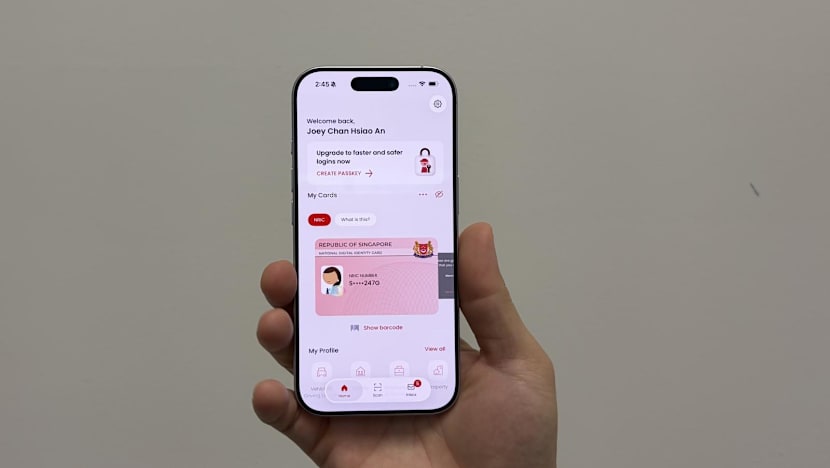
From 10am on Jul 1, iPhone users can set up a passkey after updating their Singpass app to the latest version. Once updated, they can open the app, tap on the banner on the home screen and follow the on-screen instructions to set up the passkey.
To log in, they select the passkey option on the Singpass login page and verify their identity using biometrics such as fingerprint or facial recognition, or their six-digit app passcode.
“The introduction of passkeys enables a safer login experience that curbs phishing scams without compromising usability, making digital services more secure for everyone,” said Mr Winston Teo, senior director of Singpass at GovTech Singapore.
Users who need help setting up and using passkeys can contact the Singpass helpdesk or visit a ServiceSG or Singpass counter at community centres or clubs across Singapore.